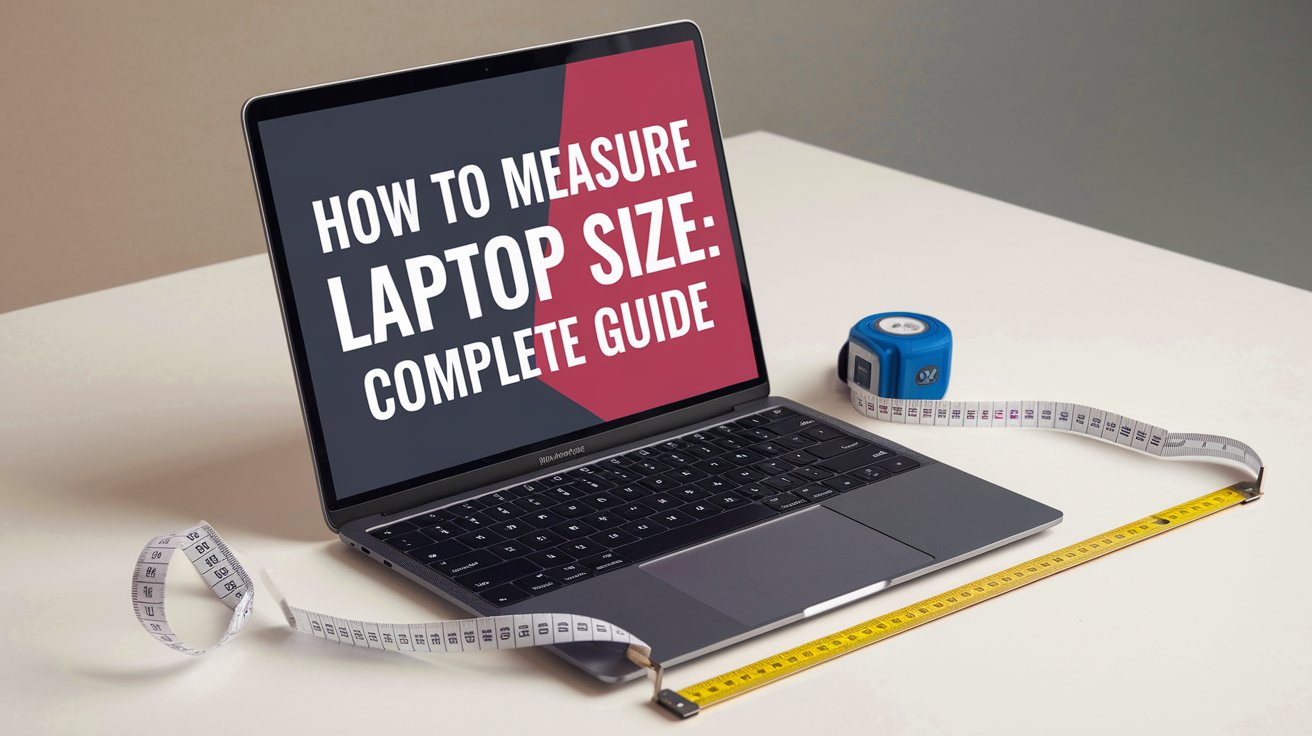
Measuring your laptop size correctly is essential whether you’re buying a protective case, upgrading to a new device, or checking compatibility with accessories. Most users think laptop size refers only to screen diagonal measurement, but accurate sizing requires measuring width, depth, and thickness. This comprehensive guide shows you exactly how to measure laptop size using simple tools you already have at home, with conversions for both inches and centimeters tailored for the United States market in 2026.
Understanding Laptop Size Measurements
When manufacturers advertise a 14 inch laptop or 15.6 inch laptop, they’re referring exclusively to the screen’s diagonal measurement from corner to corner. However, this single measurement doesn’t tell the complete story. The actual physical dimensions of your laptop include the bezel surrounding the screen, the keyboard deck, and the overall thickness. In 2026, with increasingly slim bezels and varied designs, two laptops with identical screen sizes can have significantly different overall dimensions. Understanding these distinctions helps you make informed decisions when purchasing laptop bags, sleeves, or checking desk space compatibility.
The standard laptop size in cm varies considerably by screen category. A typical 13-inch laptop measures approximately 30-32 cm wide, 21-23 cm deep, and 1.5-2 cm thick. A 15.6-inch model usually spans 35-38 cm in width, 24-26 cm in depth, and 1.8-2.5 cm in thickness. Gaming laptops and workstations typically add extra bulk for cooling systems. These measurements represent closed laptop dimensions, which are crucial for transportation and storage planning.
Essential Tools for Measuring Your Laptop
To accurately measure laptop size, you need minimal equipment that most households already possess. A standard tape measure or ruler at least 40 cm (16 inches) long works perfectly for measuring width and depth. For thickness measurements, a smaller ruler or even a credit card for comparison works well. Digital calipers provide the most precise measurements, especially for thickness, but they’re optional for most users. Ensure your measuring tool displays both inches and centimeters for easy reference when shopping for accessories designed for different measurement systems.
If you don’t have a traditional tape measure available, smartphone apps like Measure (iOS) or Google Measure (Android) can provide reasonably accurate dimensions using augmented reality technology. However, physical measuring tools remain more reliable for precise measurements needed for laptop bags and cases. In 2026, several laptop manufacturers include exact dimensions on specification stickers located on the laptop’s underside, providing instant reference without manual measurement.
How to Measure Laptop Screen Size
The laptop screen size represents the diagonal measurement from one corner to the opposite corner, measuring only the visible screen area without including the bezel. To measure this accurately, power on your laptop and display a white or bright screen for clear visibility of screen boundaries. Place your tape measure at the bottom left corner of the actual screen surface, not the bezel edge, and extend diagonally to the top right corner. Record this measurement in inches, as this is the standard convention used by manufacturers worldwide, including in the United States.
For a 15.6 inch laptop, the diagonal screen measurement will be exactly 39.6 cm. A 14 inch laptop measures 35.6 cm diagonally, while a 17 inch model spans 43.2 cm. These standardized measurements help you quickly identify compatible screen protectors, privacy filters, and replacement screens. Remember that the actual viewable area might be slightly smaller than advertised due to bezels, though modern ultra-slim designs in 2026 have minimized this difference significantly compared to older models.
Measuring Laptop Width and Depth
Close your laptop completely before measuring its physical dimensions for laptop bags and cases. Position your laptop on a flat, stable surface with the lid closed and all protruding elements like charging cables removed. To measure the width, place your tape measure at the leftmost edge of the laptop base and extend it horizontally to the rightmost edge. This measurement represents the maximum width and is crucial for ensuring your laptop fits properly in sleeves and compartments.
The depth measurement runs from the front edge nearest to you (typically where you’d rest your wrists) to the back edge where the hinges are located. For most laptops, this dimension is smaller than the width. A typical 14 inch laptop dimensions length and width in cm measure approximately 32 cm wide by 22 cm deep, though this varies by manufacturer. Gaming laptops often have deeper profiles to accommodate enhanced cooling systems and larger batteries, while ultrabooks prioritize slim profiles with depths sometimes under 20 cm for 13-inch models.
How to Measure Laptop Thickness
Laptop thickness measurement determines compatibility with slim laptop sleeves and tight compartments. With your laptop closed and resting on a flat surface, measure from the bottom base to the highest point on the lid. Most modern laptops don’t maintain uniform thickness throughout, with many tapering from thicker rear sections near hinges to thinner front edges. Always measure at the thickest point, typically near the hinge area, as this represents the minimum clearance your laptop requires.
In 2026, ultrabooks and premium laptops measure between 1.2 cm to 1.8 cm thick, while standard consumer laptops range from 1.8 cm to 2.5 cm. Gaming laptops and mobile workstations can exceed 3 cm due to powerful cooling requirements and discrete graphics cards. When shopping for a laptop bag, add at least 0.5 cm to 1 cm of clearance beyond your thickness measurement to ensure easy insertion and removal plus accommodation for charging cables if storing them together.
How to Check Laptop Size in Settings
You can check laptop screen size in settings without physical measurement through your operating system. On Windows 11, right-click the desktop, select Display Settings, then scroll to Scale and Layout where you’ll find display resolution information. Click Advanced Display Settings to see the diagonal screen size listed. This method provides manufacturer specifications but remember these represent advertised size, not precise physical dimensions for bags and cases.
Mac users can click the Apple menu, select About This Mac, then More Info, and navigate to Displays to view screen specifications. The system information includes diagonal screen measurements in inches. For Chromebook users, visit Settings, scroll to Device, then Displays for screen specifications. While these software methods quickly identify screen diagonal measurements, they don’t provide the crucial physical dimensions needed for purchasing protective accessories, making manual measurement still necessary for complete specifications.
Converting Laptop Measurements: Inches to Centimeters
Understanding both measurement systems helps when shopping across different retailers and manufacturers. To measure laptop size in inches, use a tape measure with inch markings, while converting to centimeters requires multiplying inches by 2.54. A 15.6 inch screen equals exactly 39.624 cm. For 13 inch laptop size in cm, multiply 13 by 2.54 to get 33.02 cm diagonal measurement.
Common laptop size conversions include: 11.6 inches equals 29.5 cm, 13.3 inches equals 33.8 cm, 14 inches equals 35.6 cm, 15.6 inches equals 39.6 cm, and 17.3 inches equals 43.9 cm. When purchasing international accessories or checking specifications from global manufacturers, these conversions ensure compatibility. Most United States retailers primarily use inches for laptop specifications, but understanding centimeter equivalents helps when comparing products or reading technical documentation that uses metric measurements standard in most other countries.
How to Measure Laptop Size for Bags and Cases
Selecting the right laptop bag requires knowing your laptop’s complete dimensions, not just screen size. Measure your closed laptop’s width, depth, and thickness, then add 1-2 cm clearance on each dimension for comfortable fit and protective padding. A snug fit prevents excessive movement during transport, while too-tight cases risk zipper strain and difficult insertion. Many quality laptop bags specify compatible screen sizes and provide internal compartment dimensions for verification.
When researching how to measure laptop size for bag reddit communities, users consistently recommend measuring the actual laptop rather than relying solely on screen size specifications. Two 15-inch laptops can have different physical footprints due to bezel variations. For backpacks with dedicated laptop compartments, measure the compartment’s internal dimensions and compare against your laptop measurements plus desired padding. Sleeve-style cases typically fit more snugly, requiring precise measurements with minimal clearance, usually just 0.5 cm on each side.
Common Laptop Size Categories in 2026
The United States laptop market in 2026 features several standard size categories, each serving different user needs. Ultra-portable laptops with 11-13 inch screens measure approximately 28-32 cm wide, weigh under 1.4 kg, and prioritize mobility for frequent travelers. These compact devices fit easily in small bags and airplane tray tables but sacrifice screen real estate and sometimes performance for portability.
Mainstream laptops dominate with 14-15.6 inch screens measuring 32-38 cm wide, offering balanced performance, screen size, and portability. These models suit students, business professionals, and general consumers, weighing between 1.4-2.3 kg. The 15.6 inch laptop remains the most popular size in the United States, providing comfortable viewing and full-size keyboards while remaining reasonably portable. Large-screen laptops with 17-inch or greater displays measure over 40 cm wide, serve content creators and gamers who prioritize screen space over portability, and typically remain stationary on desks. These workstation-class devices often exceed 2.7 kg and require large bags designed specifically for oversized laptops.
Why Accurate Laptop Measurements Matter
Precise measurements prevent costly purchasing mistakes and ensure proper protection for your investment. A laptop case that’s too large allows excessive movement that can damage your device during transport, while an undersized case won’t close properly or may stress seams and zippers. Accurate measurements also help when planning workspace organization, ensuring your laptop fits on desks, in drawers, or on shelves designed for technology storage.
For insurance purposes and warranty claims, having exact laptop dimensions documented helps with replacement value assessments. When traveling, knowing your laptop’s thickness and weight helps verify compliance with airline carry-on restrictions and TSA checkpoint requirements. In 2026, with increasing emphasis on sustainable purchasing, accurate measurements enable buying compatible accessories that last across multiple laptop upgrades, reducing waste from ill-fitting cases and bags that get discarded prematurely.
Alternative Methods When You Don’t Have Measuring Tools
Without a tape measure, you can still obtain reasonably accurate laptop measurements using everyday objects with known dimensions. A standard US dollar bill measures exactly 15.6 cm (6.14 inches) long, allowing you to use multiple bills as makeshift rulers. A standard business card measures 8.9 cm by 5.1 cm (3.5 by 2 inches), useful for quick reference measurements. Stack these items along your laptop’s edges and count how many fit to estimate dimensions.
Another method involves checking your laptop’s original packaging or user manual, which typically lists exact dimensions. The manufacturer’s website product specifications page provides detailed measurements for every model. Search your laptop’s model number, usually found on a sticker on the device’s underside, to find official specifications. For those comfortable with technology, augmented reality measurement apps on smartphones have improved significantly by 2026, offering accuracy within 1-2 mm for most measurements when used carefully on well-lit, contrasting surfaces.
Recording and Using Your Laptop Measurements
Once you’ve measured your laptop size, document all dimensions systematically for future reference. Create a note on your smartphone or laptop with width, depth, thickness, screen diagonal, and weight measurements in both inches and centimeters. Include your laptop’s model number and measurement date, as this information remains valuable for years when purchasing accessories, planning upgrades, or selling your device.
When shopping for laptop accessories, compare your recorded measurements against product specifications rather than relying solely on advertised compatibility. Verify that bag interior dimensions exceed your laptop dimensions by at least 1 cm on each side. For screen protectors and privacy filters, the diagonal screen measurement must match exactly. When considering laptop stands, risers, or cooling pads, ensure the platform dimensions accommodate your laptop’s footprint with stable support. These practices prevent returns, save money, and ensure proper protection for your technology investment throughout its lifecycle.
Related video about how to measure laptop size
This video complements the article information with a practical visual demonstration.
Most asked questions about how to measure laptop size
What size is a 14 inch laptop in actual dimensions?
A 14 inch laptop has a screen diagonal of 35.6 cm, but the physical laptop dimensions typically measure approximately 32-34 cm wide, 22-24 cm deep, and 1.5-2.2 cm thick when closed. The actual size varies by manufacturer due to bezel design and chassis construction. Always measure your specific laptop model for accurate dimensions when purchasing bags or cases, as the 14-inch designation refers only to screen diagonal, not the complete laptop footprint.
How big is a 15.6 inch laptop compared to other sizes?
A 15.6 inch laptop measures about 39.6 cm diagonally across the screen and typically has physical dimensions of 35-38 cm wide by 24-26 cm deep. This makes it approximately 4-5 cm wider and 2-3 cm deeper than a 14-inch laptop, but significantly more compact than 17-inch models which exceed 40 cm in width. The 15.6-inch size remains the most popular in the United States for balancing screen space with reasonable portability, fitting comfortably in standard laptop bags while providing adequate workspace for productivity tasks.
How is a 17 inch laptop measured?
A 17 inch laptop is measured diagonally from one corner of the screen to the opposite corner, equaling 43.2 cm. The physical laptop dimensions typically span 40-42 cm in width, 27-30 cm in depth, and 2-3.5 cm in thickness. To measure accurately, use a tape measure on the visible screen area only, excluding bezels. For bag compatibility, measure the entire closed laptop including all edges. These large laptops require specially sized bags and usually serve as desktop replacements due to their substantial size and weight, often exceeding 3 kg.
How do I check what size my laptop is without measuring?
You can check laptop size without physical measurement by accessing system settings. On Windows 11, go to Settings, System, Display, then Advanced Display to see screen specifications. Mac users click the Apple menu, About This Mac, then Displays for screen size information. Alternatively, check the original product packaging, user manual, or search your laptop’s model number online for manufacturer specifications. The model number usually appears on a sticker on the laptop’s bottom panel and provides access to complete dimensional specifications including width, depth, thickness, and weight.
What measurements do I need for buying a laptop bag?
For purchasing a laptop bag, you need three critical measurements: width, depth, and thickness of your closed laptop. Measure from edge to edge at the widest points, then add 1-2 cm clearance on each dimension for proper fit with padding. While screen diagonal size helps narrow options, two laptops with identical screen sizes can have different physical dimensions. Verify the bag’s internal compartment dimensions match or slightly exceed your laptop measurements. Also consider thickness when measured at the thickest point near hinges, as this determines whether your laptop fits in slim sleeves versus padded compartments.
Should I measure my laptop in inches or centimeters?
In the United States, measure laptop size in inches as this matches manufacturer specifications and retail product descriptions. However, knowing measurements in both systems proves valuable since many international accessories and cases use centimeters. To convert, multiply inches by 2.54 for centimeters, or divide centimeters by 2.54 for inches. Most quality measuring tapes display both units simultaneously. Record your laptop dimensions in both measurement systems for maximum compatibility when shopping across different retailers, manufacturers, and international marketplaces that may use either standard.
| Measurement Type | What It Measures | Why It Matters |
|---|---|---|
| Screen Diagonal | Corner to corner of visible screen (13-17 inches typical) | Identifies laptop category and screen protector compatibility |
| Width | Left edge to right edge (28-42 cm typical range) | Critical for bag fit and desk space planning |
| Depth | Front edge to back hinge (20-30 cm typical range) | Determines bag compartment compatibility and workspace requirements |
| Thickness | Bottom to top when closed (1.2-3.5 cm typical) | Essential for sleeve fit and carry-on compliance |
| Clearance | Add 1-2 cm to each dimension for bags | Ensures comfortable fit with protective padding |