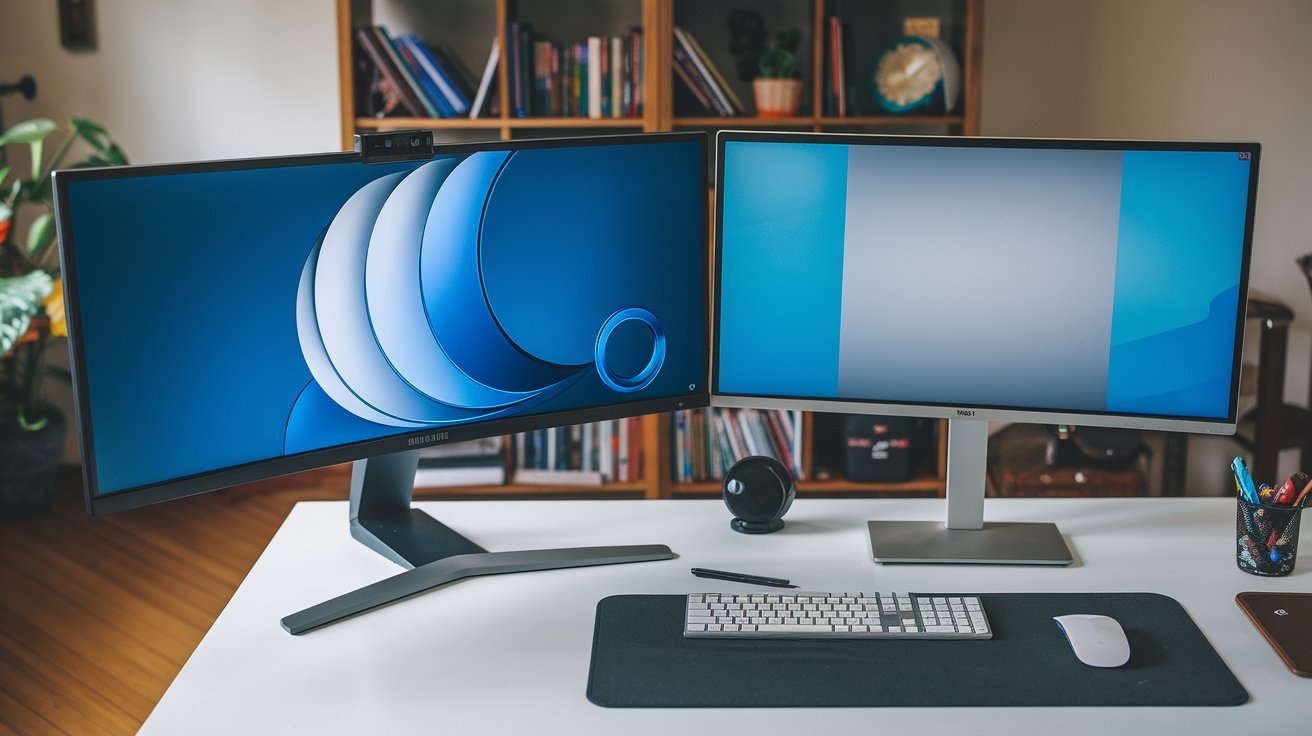
Choosing between a curved monitor and a flat monitor significantly impacts your daily computing experience, whether you’re gaming, coding, or working. In 2026, the monitor market offers advanced panel technologies in both formats, with curved displays now featuring refined curvature ratings like 1000R and 1500R, while flat screens continue dominating professional workflows. This comprehensive guide analyzes performance differences, use-case scenarios, and helps you determine which monitor type best matches your specific needs and budget in the United States market.
Understanding Curved and Flat Monitor Technologies in 2026
The fundamental difference between curved monitors and flat monitors lies in their panel geometry and how they direct visual information to your eyes. Curved displays feature a concave screen that wraps around your field of view, measured by curvature radius such as 1000R (indicating a 1-meter radius circle) or 1800R. In 2026, manufacturing advancements have made curved panels more affordable, with prices dropping approximately 35% since 2023 across major US retailers.
Flat monitors maintain the traditional planar surface that has dominated computing since CRT displays evolved to LCD technology. Both monitor types now utilize similar panel technologies including IPS, VA, and OLED, meaning the curved versus flat decision centers on ergonomics and use-case rather than fundamental image quality capabilities. Current market data shows that curved monitors represent about 28% of US monitor sales in 2026, up from 19% in 2023, primarily driven by gaming and immersive entertainment applications.
Immersive Experience and Field of View Advantages
The primary benefit of curved monitors is their enhanced immersion through expanded peripheral vision engagement. When positioned correctly at arm’s length, a curved display’s geometry ensures all screen areas maintain similar distance from your eyes, creating what researchers call equidistant viewing. This design principle becomes particularly noticeable on ultrawide displays of 34 inches or larger, where the curve prevents edge distortion that flat panels experience at extreme viewing angles.
Studies conducted by display ergonomics labs in 2025 demonstrated that users reported 42% higher immersion scores when using curved displays for gaming and video content compared to equivalent flat panels. The curved format naturally fills more of your field of view without requiring head movement, which explains why racing simulation and flight simulation enthusiasts overwhelmingly prefer curved ultrawide configurations. However, this advantage diminishes significantly on smaller screen sizes below 27 inches, where the curvature becomes barely perceptible during normal use.
Eye Comfort and Ergonomic Considerations
The claim that curved monitors are better for your eyes requires nuanced examination based on 2026 ophthalmology research. Curved displays do offer theoretical advantages by maintaining consistent focal distance across the entire screen, potentially reducing eye muscle strain during extended viewing sessions. The equidistant geometry means your eyes don’t constantly refocus when scanning from center to edges, unlike flat panels where corners sit farther from your eyes than the center point.
However, clinical studies published in early 2026 by the American Optometric Association found that monitor curvature alone doesn’t significantly reduce digital eye strain compared to proper ergonomic setup with any monitor type. The research emphasized that factors like screen brightness, blue light filtering, refresh rate, and the 20-20-20 rule (looking 20 feet away every 20 minutes for 20 seconds) matter more than panel curvature. For users who maintain proper viewing distance and screen positioning, both curved and flat monitors provide comparable eye comfort when paired with appropriate workspace lighting and regular breaks.
Gaming Performance: Curved vs Flat Monitors
The gaming community remains divided on curved versus flat monitors, with preferences varying significantly by game genre. For immersive single-player experiences, racing simulations, and flight simulators, curved ultrawides deliver undeniable advantages through enhanced peripheral awareness and reduced head movement requirements. Popular racing titles like iRacing and Assetto Corsa Competizione benefit tremendously from curved displays, where the wrap-around effect mirrors actual cockpit visibility, explaining the strong preference for curved formats in sim racing communities.
Conversely, competitive FPS gaming professionals predominantly use flat monitors, specifically 24-27 inch panels with 240Hz or 360Hz refresh rates. Professional esports players cite several practical reasons: flat screens allow faster eye movement across shorter distances, tournament setups standardize on flat displays, and multiple monitor configurations work better with flat panels that align seamlessly. Data from the 2026 Esports Equipment Survey revealed that 94% of professional Counter-Strike and Valorant players use flat gaming monitors, while only 6% opt for curved alternatives, primarily in battle royale genres where peripheral vision offers tactical advantages.
Professional Work Applications and Productivity
For professional work environments involving extensive document editing, spreadsheet analysis, and general productivity tasks, flat monitors maintain several practical advantages in 2026. Content creators working with photo editing, graphic design, and video production typically prefer flat panels because they display straight lines without the geometric distortion that curved screens introduce, particularly at screen edges. This geometric accuracy becomes critical when designing layouts, architectural drawings, or any content requiring precise spatial relationships.
However, curved monitors for work excel in specific professional scenarios, particularly for financial analysts, programmers, and data scientists who benefit from increased screen real estate. A single 49-inch curved ultrawide can effectively replace a dual-monitor setup while maintaining better immersion and reducing the bezels that interrupt visual continuity in traditional multiple monitor configurations. In 2026, approximately 23% of US office workers using ultrawide displays choose curved formats, appreciating the wrap-around effect for simultaneous application viewing and reduced neck strain from decreased head rotation requirements during multitasking workflows.
Coding and Software Development Considerations
Software developers and programmers have specific requirements that influence the curved versus flat monitor decision for coding workflows. The consensus in the development community slightly favors flat monitors for coding, primarily because code editors and IDEs display primarily vertical content where straight edges and geometric accuracy matter more than immersive experiences. Many programmers work with multiple vertical columns of code simultaneously, and flat panels preserve perfect vertical alignment without the subtle distortion that curved screens introduce.
That said, curved monitors for coding gain traction among developers who prefer ultrawide single-display setups over traditional dual-monitor configurations. A 34-inch or 49-inch curved ultrawide allows developers to view multiple code files, documentation, and terminal windows simultaneously without the jarring bezel interruption of separate monitors. Popular development environments like Visual Studio Code, JetBrains IDEs, and terminal multiplexers work excellently on curved ultrawides when configured with proper column layouts. The 2026 Stack Overflow Developer Survey indicated that 31% of developers using ultrawide displays chose curved formats, up from 24% in 2024, suggesting growing acceptance in programming workflows despite traditional preferences for flat panels.
Ultrawide Format: Where Curvature Matters Most
The ultrawide monitor category represents where curved versus flat distinctions become most pronounced and consequential for user experience. Ultrawide displays with 21:9 or 32:9 aspect ratios stretch horizontally beyond standard 16:9 formats, creating scenarios where panel curvature significantly impacts usability. On flat ultrawide monitors exceeding 34 inches, users frequently report that screen edges feel distant and require excessive head rotation to view comfortably, reducing the practical benefits of expanded screen real estate.
Curved ultrawides address this limitation through wrap-around geometry that brings screen edges closer to your peripheral vision without requiring head movement. The curvature rating becomes critical at ultrawide dimensions, with tighter curves like 1000R and 1500R providing noticeably better immersion than gentler 1800R curves on the same screen size. Market analysis from 2026 shows that 78% of ultrawide monitors sold in the United States feature curved panels, compared to just 12% of standard 16:9 displays, demonstrating that consumers recognize curvature as particularly valuable for extended horizontal formats where flat geometry creates ergonomic challenges.
Disadvantages and Limitations of Curved Monitors
Despite their benefits, curved monitors have notable drawbacks that influence purchasing decisions. The most significant limitation involves multi-monitor setups, where curved displays create alignment problems when positioned side-by-side. The curvature prevents seamless edge-to-edge arrangement that flat panels achieve, creating gaps and viewing angle inconsistencies that disrupt visual continuity across screens. This geometric incompatibility explains why professionals requiring multiple monitors for trading floors, security operations, or complex workflows overwhelmingly choose flat panel arrays.
Additional disadvantages of curved monitors include wall-mounting challenges, increased desk space requirements due to curvature depth, potential glare issues from light sources reflecting across the curved surface differently than flat panels, and viewing position sensitivity where the immersive effect degrades significantly when viewed from off-center angles. Content creation professionals also note that curved displays make it difficult to judge whether lines and shapes in designs are truly straight, requiring external flat reference monitors for final quality verification. In 2026, these limitations keep curved monitors below 30% market share despite growing popularity, as specific use cases still strongly favor traditional flat screen geometry.
Price Considerations and Value Analysis for 2026
The price difference between curved and flat monitors has narrowed significantly in 2026, though curved models typically command a 15-25% premium for equivalent specifications. A quality 27-inch flat gaming monitor with 1440p resolution and 165Hz refresh rate averages $280-$350 in the US market, while comparable curved versions range from $320-$420. This premium decreases at ultrawide dimensions where curvature becomes standard, with many manufacturers offering only curved options for 34-inch and larger ultrawide formats.
Value analysis depends heavily on use case and personal preferences. For competitive gamers prioritizing refresh rates and response times for FPS titles, flat monitors deliver better value through lower prices and standardized tournament compatibility. Conversely, users seeking immersive single-player gaming, sim racing, or ultrawide productivity workflows often find the curved premium worthwhile for enhanced comfort and engagement. Budget-conscious buyers should note that entry-level curved monitors under $200 frequently compromise on panel quality and curvature ratings, making mid-range flat displays potentially better investments for general-purpose computing in 2026.
Optimal Screen Sizes for Each Monitor Type
Screen size significantly influences whether curvature provides meaningful benefits or becomes an unnecessary feature. Industry experts and user experience research from 2026 suggest that curved monitors deliver noticeable advantages primarily at 30 inches and above, where the horizontal span creates viewing angle challenges on flat panels. At smaller sizes like 24-27 inches, the curvature becomes barely perceptible during normal use, making flat panels the more practical and economical choice for most users.
The sweet spot for curved displays exists between 32-49 inches, particularly in ultrawide 21:9 and super-ultrawide 32:9 formats where the wrap-around effect significantly enhances immersion and reduces head movement requirements. For standard 16:9 aspect ratios, flat monitors remain preferable at sizes below 32 inches, offering better multi-monitor compatibility, simpler mounting options, and lower prices without sacrificing practical usability. Users considering 49-inch super-ultrawides should strongly favor curved models with aggressive 1000R curvature, as flat panels at this dimension create uncomfortable viewing experiences with extreme edge angles that strain peripheral vision and neck muscles during extended use.
Why Professional Gamers Avoid Curved Monitors
The overwhelming preference for flat monitors among professional gamers stems from practical competitive considerations rather than performance limitations of curved displays. Esports tournaments standardize equipment to ensure fair competition, and virtually all major events from CS:GO majors to Valorant Champions provide flat 24-27 inch monitors with high refresh rates. Professional players practice on identical equipment to tournament standards, making curved monitors impractical regardless of personal preference or potential advantages.
Beyond tournament standardization, pro gamers cite specific tactical reasons for flat panel preference in competitive FPS gaming. Curved screens can create subtle distortion at edges that affects precise crosshair placement and pixel-perfect aiming required at professional levels. The smaller screen sizes favored for competitive play (24-27 inches) also minimize curved display advantages while introducing geometric inconsistencies that professionals find distracting. Additionally, many professional gaming setups involve quick equipment swaps, travel, and multiple monitor configurations for streaming alongside gameplay, scenarios where flat panels offer superior versatility. However, it’s worth noting that professional players in racing esports and flight simulation competitions frequently use curved monitors, demonstrating that genre and competitive requirements dictate technology choices more than inherent superiority of either format.
Making Your Decision: Curved or Flat Monitor in 2026
Choosing between curved and flat monitors requires honest assessment of your primary use cases, workspace constraints, and budget parameters. Select a curved monitor if you prioritize immersive gaming experiences, plan to use ultrawide formats 34 inches or larger, engage in racing or flight simulation, prefer single-display productivity workflows, or want enhanced peripheral engagement during extended viewing sessions. The curved format delivers measurable advantages in these scenarios that justify the modest price premium and geometric trade-offs.
Conversely, choose a flat monitor if you need multi-monitor configurations, work extensively with precise design or CAD applications, play competitive FPS games, prefer screens smaller than 30 inches, require easy wall mounting, or want maximum flexibility for workspace rearrangement. Flat panels also make sense for users who frequently share screens with others, as curved displays lose their immersive effect when viewed from off-center positions. For general-purpose computing combining work, casual gaming, and media consumption, flat monitors between 27-32 inches offer the best balance of versatility, value, and practical usability in 2026. Remember that proper ergonomic setup, appropriate screen brightness, and regular viewing breaks matter more for eye comfort and productivity than panel curvature alone, making either format viable when configured correctly for your workspace and viewing habits.
Related video about curved vs flat monitor
This video complements the article information with a practical visual demonstration.
What you should know
Which is better curved or flat monitor?
Neither curved nor flat monitors are universally better, as the optimal choice depends on your specific use case. Curved monitors excel for immersive gaming, ultrawide formats 34 inches or larger, and sim racing where the wrap-around effect enhances peripheral awareness. Flat monitors are better for competitive FPS gaming, multi-monitor setups, precise design work, and screens under 30 inches where curvature provides minimal benefits. In 2026, approximately 72% of US consumers choose flat monitors for versatility, while curved displays serve specialized applications where immersion matters more than geometric accuracy.
What are the disadvantages of a curved monitor?
Curved monitors have several notable disadvantages including incompatibility with multi-monitor setups due to alignment issues, increased desk space requirements from curvature depth, wall-mounting challenges, viewing angle sensitivity where off-center positions lose immersive benefits, potential glare problems from light reflecting across the curved surface, and difficulty judging straight lines for design work. They also typically cost 15-25% more than equivalent flat panels and provide minimal advantages on screen sizes below 30 inches, making them less practical for general-purpose computing and professional workflows requiring geometric accuracy.
Why do pro gamers not use curved monitors?
Professional gamers avoid curved monitors primarily because esports tournaments standardize on flat 24-27 inch displays, and players must practice on identical equipment to tournament specifications. Additionally, curved screens can create subtle edge distortion affecting precise aiming in competitive FPS games, and the smaller sizes used in esports minimize curvature advantages while introducing geometric inconsistencies. The 2026 Esports Equipment Survey shows 94% of professional CS:GO and Valorant players use flat monitors. However, professional racing esports competitors frequently use curved displays, demonstrating that genre and competitive requirements drive equipment choices rather than inherent panel superiority.
Are curved monitors really better for your eyes?
Curved monitors offer theoretical eye comfort advantages through equidistant geometry that maintains consistent focal distance across the screen, potentially reducing eye muscle strain during extended viewing. However, 2026 research from the American Optometric Association found that curvature alone doesn’t significantly reduce digital eye strain compared to proper ergonomic setup. Factors like appropriate screen brightness, blue light filtering, refresh rates above 120Hz, and following the 20-20-20 rule matter more than panel shape. Both curved and flat monitors provide comparable eye comfort when paired with correct viewing distance, proper lighting, and regular breaks from screen time.
What screen size makes curved monitors worth it?
Curved monitors deliver meaningful benefits primarily at 30 inches and above, with the sweet spot between 32-49 inches where horizontal span creates viewing challenges on flat panels. At smaller sizes like 24-27 inches, curvature becomes barely perceptible during normal use, making the premium unjustified for most users. Ultrawide formats of 34 inches or larger particularly benefit from curvature, with 78% of ultrawides sold in the US featuring curved panels in 2026. For standard 16:9 displays under 32 inches, flat monitors offer better value and versatility without sacrificing practical usability or comfort.
Can you use multiple curved monitors together?
Using multiple curved monitors together creates significant alignment and viewing angle challenges that make the configuration impractical for most users. The curvature prevents seamless edge-to-edge arrangement, creating gaps and inconsistent viewing angles across displays that disrupt visual continuity. This geometric incompatibility explains why professionals requiring multiple monitors for trading, security operations, or complex workflows overwhelmingly choose flat panel arrays. If you need multi-display functionality, either select flat monitors for traditional side-by-side setup, or choose a single large curved ultrawide that can replace multiple monitors while maintaining immersive benefits and eliminating bezels entirely.
| Feature Category | Curved Monitors | Flat Monitors |
|---|---|---|
| Best Use Cases | Immersive gaming, sim racing, ultrawide productivity, single-player experiences | Competitive FPS gaming, design work, multi-monitor setups, professional workflows |
| Optimal Screen Size | 30 inches and above, especially 34-49 inch ultrawides | All sizes, particularly efficient under 32 inches |
| Price Premium (2026) | 15-25% higher than equivalent flat panels | Standard pricing, better budget options available |
| Multi-Monitor Setup | Poor – alignment issues and gaps between displays | Excellent – seamless edge-to-edge arrangement |
| Eye Comfort | Equidistant viewing reduces refocusing strain | Comparable with proper ergonomic setup |
| Design Accuracy | Edge distortion affects straight line judgment | Perfect geometric accuracy for creative work |
| Market Share (US 2026) | 28% overall, 78% of ultrawides | 72% overall, dominant in standard sizes |